In today’s fast-paced digital world, managing information efficiently is more critical than ever. With the explosion of online content, research papers, and project data, professionals, students, and entrepreneurs often find themselves overwhelmed. Enter Napkin AI, an innovative AI-powered knowledge tool designed to simplify the way we capture, organize, and retrieve information. Whether you are conducting research, preparing reports, or managing complex projects, Napkin AI promises to streamline your workflow and enhance productivity.
Understanding Napkin AI: A Brief Overview
At its core, Napkin AI is an intelligent knowledge management system. Unlike traditional note-taking applications, it leverages artificial intelligence to help users summarize, categorize, and extract insights from vast amounts of data. The platform’s design prioritizes simplicity and efficiency, enabling users to focus on understanding and applying information rather than merely storing it.
One of the standout features of Napkin AI is its ability to process both structured and unstructured data. This means that whether you’re dealing with PDFs, spreadsheets, web articles, or email threads, Napkin AI can analyze the content and organize it intelligently. The result is a centralized knowledge repository that is not just searchable but contextually meaningful.
How Napkin AI Works
Napkin AI operates using advanced natural language processing (NLP) algorithms. These algorithms allow the tool to understand the semantic meaning of text rather than just keyword matching. When you input data into Napkin AI, it can:
-
Summarize long documents into concise, digestible insights
-
Identify key topics and themes
-
Categorize information into logical clusters
-
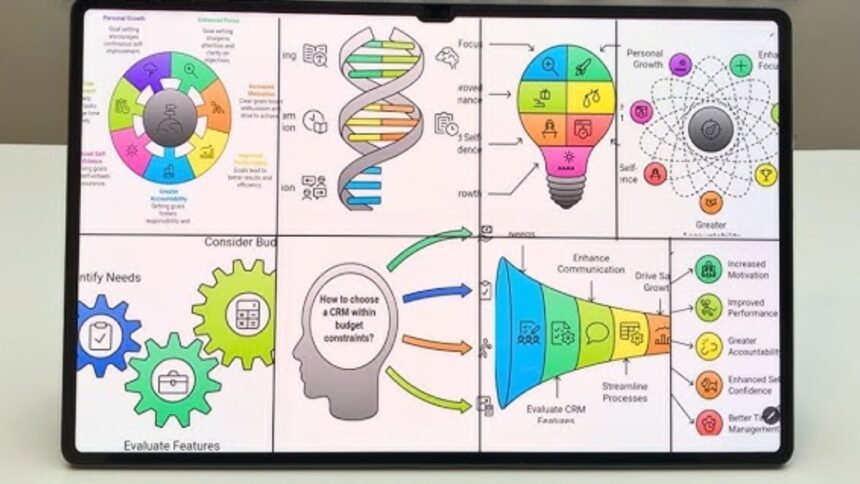
Generate visual aids such as diagrams or concept maps
This intelligent processing reduces the time spent on manual data review and ensures that important insights are never overlooked.
Key Features of Napkin AI
Napkin AI offers a range of features that make it a versatile tool for knowledge management:
1. Smart Summarization
Napkin AI can condense lengthy articles, reports, or books into key takeaways. This is particularly valuable for professionals who need to stay updated without reading every detail.
2. Visual Knowledge Mapping
The platform allows users to create concept maps and diagrams automatically, providing a visual representation of relationships between ideas. This feature is beneficial for students, researchers, and teams working on complex projects.
3. Contextual Search
Unlike traditional search functions, Napkin AI’s contextual search understands the meaning behind queries. This ensures that users find relevant information quickly, even if they do not know the exact keywords.
4. Integration with Popular Tools
Napkin AI can be integrated with tools like Google Docs, Slack, and Notion. This enables seamless knowledge management across platforms and enhances collaborative work.
5. AI-Powered Insights
The platform not only stores information but also provides actionable insights, such as trends, correlations, or suggested actions based on the data analyzed.
Benefits of Using Napkin AI
Using Napkin AI goes beyond simple note-taking. The tool offers several practical benefits for professionals and students alike:
-
Time Efficiency: Automated summarization and categorization save hours of manual work.
-
Improved Knowledge Retention: Concept mapping and organized data presentation enhance understanding and memory.
-
Collaboration Made Easy: Teams can share insights, updates, and visual knowledge maps in real-time.
-
Reduced Information Overload: Napkin AI filters and highlights what is truly important.
By addressing common challenges in information management, Napkin AI empowers users to focus on strategy, analysis, and decision-making.
Napkin AI for Professionals
For professionals, especially in industries such as consulting, research, marketing, or project management, Napkin AI can be a game-changer. Imagine being able to condense a 100-page report into a 10-minute read or generate a visual map of a project plan in seconds. These capabilities help professionals make informed decisions faster, communicate ideas clearly, and maintain a competitive edge.
Napkin AI for Students and Researchers
Students and researchers often face the daunting task of synthesizing large volumes of information. Napkin AI can streamline this process by summarizing academic papers, generating study notes, and identifying key themes across multiple sources. The AI-powered insights also aid in forming research hypotheses, comparing data trends, and organizing reference material efficiently.
Security and Privacy Considerations
When dealing with sensitive information, security is paramount. Napkin AI implements advanced encryption and secure data storage practices to protect user data. Additionally, the platform allows users to control permissions, ensuring that only authorized team members can access certain knowledge bases. This level of data security makes Napkin AI suitable for corporate environments where confidentiality is critical.
Pricing and Accessibility
Napkin AI offers tiered pricing plans designed to accommodate individuals, small teams, and large enterprises. While there is a free version available with basic features, paid plans unlock advanced functionalities such as enhanced summarization, unlimited storage, and team collaboration tools. The accessibility of the platform ensures that users at all levels can benefit from AI-driven knowledge management without breaking the bank.
How Napkin AI Enhances Workflow Productivity
Napkin AI is not just a tool for storing information—it transforms the way work gets done. By reducing the time spent searching for data, manually summarizing content, or organizing notes, users can dedicate more energy to higher-value tasks. Project timelines shrink, research becomes more precise, and teams experience smoother collaboration. The AI’s predictive insights also help anticipate bottlenecks or highlight areas needing attention, further boosting productivity.
Real-World Applications
The versatility of Napkin AI extends across various industries:
-
Healthcare: Summarizing patient records and medical research for faster decision-making
-
Education: Assisting students with complex subjects by generating study guides and concept maps
-
Business Intelligence: Analyzing market trends and competitor reports to inform strategy
-
Content Creation: Helping writers and marketers quickly outline articles, blog posts, or reports
These examples demonstrate how Napkin AI is not limited to a single domain but can be a valuable asset wherever knowledge management is key.
User Experience and Interface
One of the reasons Napkin AI has gained traction is its intuitive interface. Users can easily upload documents, tag important content, and navigate through knowledge maps without prior technical expertise. The clean design reduces cognitive load, while AI-driven suggestions guide users in maximizing the tool’s potential. This ease of use contributes significantly to adoption in professional and academic settings.
Final Thoughts
Napkin AI is more than just another note-taking app—it is a comprehensive AI-powered knowledge tool that simplifies how we capture, organize, and utilize information. By combining smart summarization, contextual search, visual mapping, and actionable insights, Napkin AI addresses one of the biggest challenges of the digital age: information overload. Whether you are a professional aiming to enhance workflow efficiency or a student seeking to master complex topics, Napkin AI offers the tools needed to stay organized, informed, and ahead of the curve. Investing time in learning and integrating this platform into your daily routine can lead to more productive work, clearer insights, and smarter decision-making.
Frequently Asked Questions (FAQs)
1. Is Napkin AI suitable for students?
Yes, Napkin AI is highly suitable for students. It helps summarize textbooks, research papers, and lecture notes while generating visual study aids like concept maps. This makes learning more efficient and supports better retention of information.
2. Can Napkin AI integrate with other productivity tools?
Absolutely. Napkin AI integrates with popular platforms such as Google Docs, Notion, and Slack. These integrations allow seamless knowledge management across different tools and improve team collaboration.
3. How secure is the data stored in Napkin AI?
Napkin AI employs advanced encryption and secure data storage protocols to protect user information. Users can also set permissions for team access, ensuring sensitive data remains confidential.
4. Does Napkin AI require technical expertise to use?
No technical expertise is required. The platform is designed with an intuitive interface that guides users through uploading documents, creating knowledge maps, and generating insights effortlessly.
5. What industries can benefit most from Napkin AI?
Napkin AI is versatile and can benefit industries such as healthcare, education, business intelligence, marketing, and research. Any field that relies on processing large volumes of information can leverage Napkin AI to enhance productivity and decision-making.
FOR MORE : FLIPPAMAGAZINE